Event-driven daemon that toggles GNOME's built-in OSK based on
physical keyboard presence. No polling. Built on
pyudev's MonitorObserver watching the
input subsystem.
Shipped as a systemd user service. Logs via
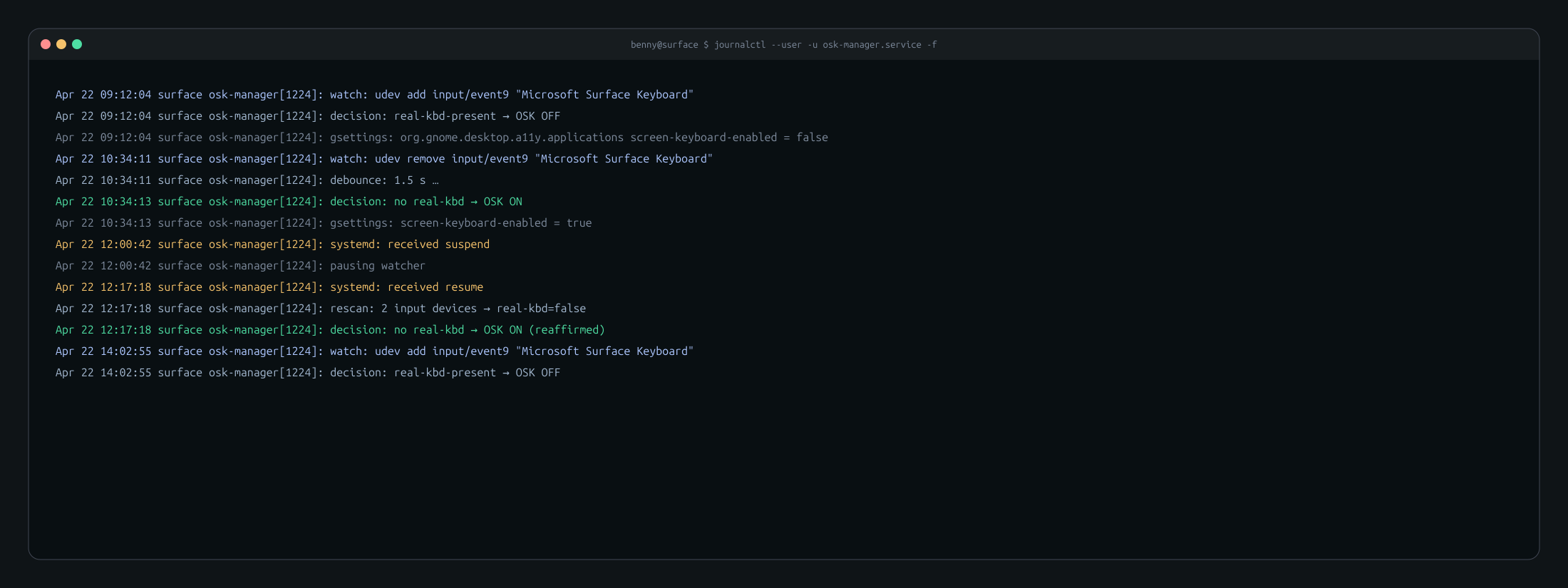
journalctl --user -u osk-manager.service. Installer
sets up the GDM login-screen OSK too via a
machinectl shell gdm@ one-liner.
udev says "this is a keyboard" for a lot of things that aren't really keyboards — touchscreens with volume keys, mice with media buttons, specific webcams. You can't just listen for a keyboard event and toggle.
The right thing to check is both the udev property and the evdev key capability set — a real keyboard has alphabetic keys. A media-key-only device doesn't.
How it works
Event-driven, not polled
pyudev.MonitorObserver on the input
subsystem delivers add/remove events in real time. No loop, no sleep,
no burn-cpu-for-nothing.
Two-stage keyboard detection
First filter by udev properties (ID_INPUT_KEYBOARD=1),
then open the evdev device and verify it actually has alphabetic key
capabilities. Touchscreens and mice with media keys get rejected at
stage 2.
1.5 s debounce on removal
The Type Cover fold generates multiple remove events in quick succession. 1.5 s debounce absorbs them — no OSK flicker when the kickstand hinges.
Sleep/resume listener
Listens on D-Bus for
org.freedesktop.login1 PrepareForSleep. On
resume, re-scans the input subsystem 3 s later — enough for udev to
re-enumerate devices. Handles "wake up with the Type Cover attached"
and "wake up without it" equally.
Installer does the login screen too
A GDM user (gdm) runs the login screen. That user has
its own org.gnome.desktop.a11y.applications settings.
The installer reaches into its dconf via
machinectl shell gdm@ and flips
screen-keyboard-enabled to true. Without
this, the OSK only works after login.
One install script. Idempotent. Works on a vanilla Ubuntu 24.04 install of the linux-surface kernel.